
The Wallet Engagement Platform That Shows You Who's Engaged
A wallet engagement platform that keeps your pass working after it's added to your audiences wallet, grades every pass holder by how engaged they are, and shows you the sales it generates.
PushPass sends notifications to the lock screen, rewards each action with points and levels, and counts what people do from the first tap to the sale. There’s no app to download and nothing to fill in.
Rather talk it through? Book a 15-minute call
What Wallet Engagement Means
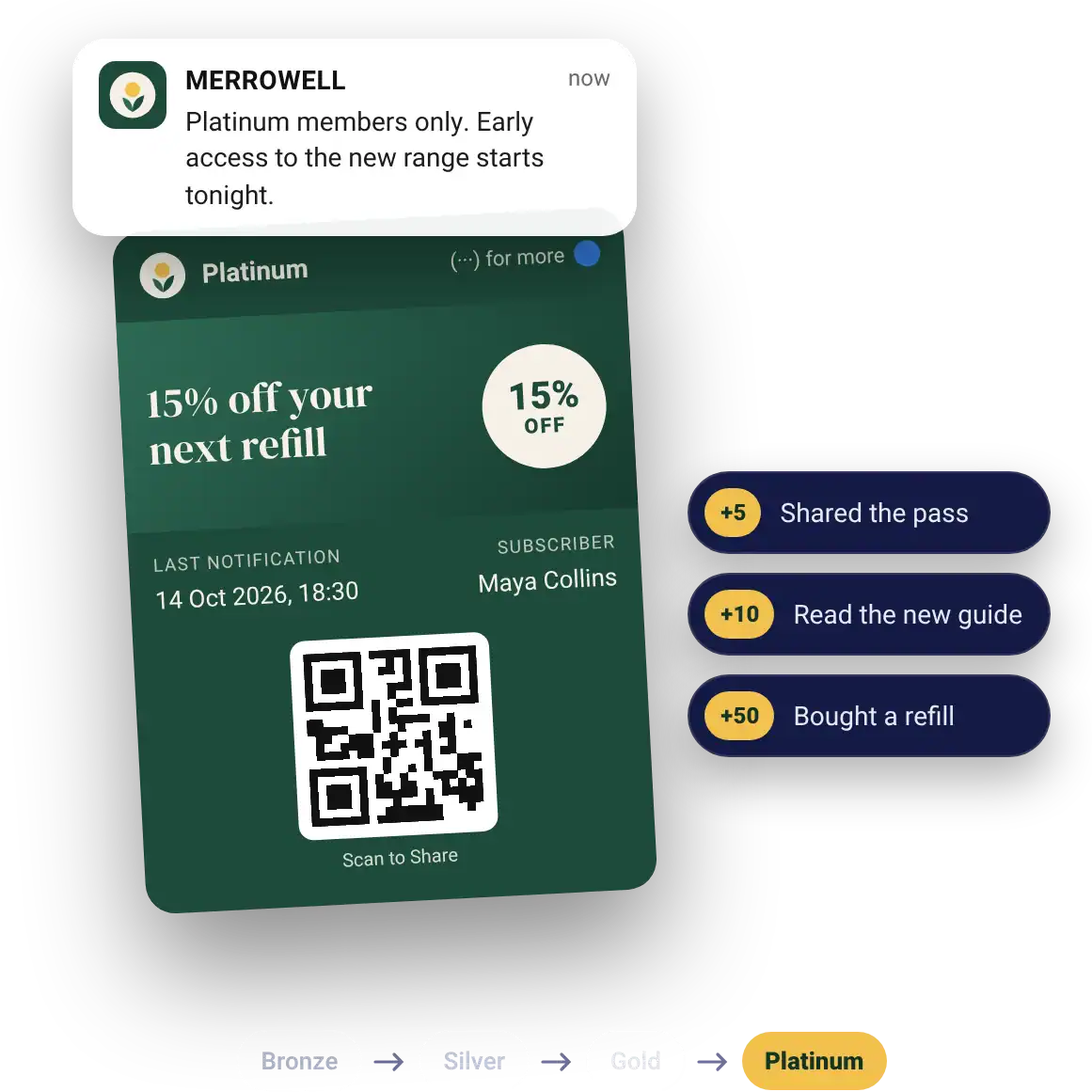
Wallet engagement is what people do with your pass after they add it. They see your notifications on their lock screen, tap through, earn points, share the pass with friends and buy. A pass that sits in the wallet and never hears from you is storage, not engagement.
A wallet engagement platform gives you the tools to keep that going and the numbers to see it working. PushPass does it through Apple Wallet and Google Wallet, so there’s no app to build and nothing for your audience to download.
- ○Added once, then nothing
- ○No idea who's still interested
- ○No way to tell what it's worth
- ✓Notifications on the lock screen
- ✓Points and levels for every action
- ✓Friends added through Scan to Share
- ✓Clicks and sales counted
The Wallet Engagement Loop
Engagement is a loop, not a launch. Every turn of it gives you a reason to send the next notification and a number to judge it by, and it all runs on our push notification platform.

Add. One tap from a link or a QR code puts the pass in Apple Wallet or Google Wallet.
Notify. Your notification appears on their lock screen, to everyone, one level or one person.
Click. They tap through to wherever you send them, and every click is counted.
Earn. Clicks, shares and purchases earn the points you choose.
Level up. Points move them up your levels, and their level shows on the pass.
Share. Scan to Share lets them show the pass to a friend, who adds it in one tap.
Buy. Sales from each notification are tracked back to it, and the loop starts again.
Grade Your Audience by Engagement
Every action earns points and every level has a name, so your audience sorts itself by how engaged each person is. Your most engaged people rise to the top level without you asking anyone for their name.
Every action counts
Not just purchases. Sharing, reading and clicking count too.
Send to one level
Talk to your most engaged people differently from everyone else.
The level is on the pass
People see where they stand every time they open their wallet.
Levels in your own words
Call each level whatever suits your brand. Merrowell keeps it simple with Bronze, Silver, Gold and Platinum.
Levels and points are set up in our digital loyalty card platform.

What to Send, and When
The best wallet engagement comes from a few well-timed notifications, not a constant stream. Use them for news people actually want, and every notification makes the pass more valuable.
The last one is sent by our API when your own systems know an order is due. See how the API works on our wallet pass platform page.
Engagement You Can Measure
PushPass counts what people do. Your dashboard shows passes added by campaign type, the clicks on every notification, and the sales each one brings in through our tracking snippet that sits on your order “Thank you” confirmation page.
We count the actions you can trust, passes added, clicks, loyalty levels reached and sales.
- Overall engagement rate
- Top engaged notifications
- Top value notifications
- Passes added per campaign
- Sales from each notification
- Each pass holder's level, ready to export

An example dashboard for Merrowell, a demo brand.
Engagement That Paid Off
Bev Channell, Festival of Food & Drink
“Students don’t often communicate by emails, so this has been a lifeline to us. We’ve built brand loyalty and virality with the ability to share our pass with our students, and it’s so easy to use.”
Jovi Gill, Varsity Student Lets
Where Wallet Engagement Fits
Engagement is what the rest of PushPass adds up to. Each part has its own page.
See Wallet Engagement on Your Own Lock Screen
On a 15-minute call we’ll set up a pass in your brand and send a notification to your own lock screen, so you can tap it and see what your audience would see.
- A 15-minute call
- Your brand's pass on your phone
- A notification you can tap
Wallet engagement platform FAQs
What brands ask about keeping a wallet audience engaged.
What is a wallet engagement platform?
A wallet engagement platform keeps people engaged with your brand through the pass in their Apple Wallet or Google Wallet after they add it. PushPass does it with lock screen notifications, loyalty levels and points, Scan to Share and tracking through to sales.
How is wallet engagement measured?
By what people do. PushPass counts passes added, clicks on every notification, the points and levels people reach, and the sales each notification brings in. It doesn’t report open rates.
What is the overall engagement rate?
The percentage of your pass holders who clicked a notification in the period you choose. It sits on your dashboard beside your top engaged and top value notifications.
How do I know who my most engaged people are?
Their level tells you. Every action earns points and points move people up the levels you name, so your most engaged pass holders reach the top level. You can see each person’s level in your dashboard.
Can I send a notification only to my most engaged pass holders?
Yes. You can send to everyone, to one level or to one person, so your top level can hear about things before anyone else.
How often should I send notifications?
When you have news people want. Fewer, better-timed notifications keep people engaged for longer than a constant stream.
Do points only come from purchases?
No. Points can come from clicking a notification’s link, sharing the pass, and buying where your shop or till is connected. You choose the actions and how many points each one earns.
How does sharing the pass help engagement?
Every pass can carry a Scan to Share QR code. A pass holder shows it to a friend, one tap adds the same pass, and the person who shared earns points, so your most engaged people grow your audience for you.
Can my own systems trigger notifications?
Yes. Our API sends a notification when something happens in your systems, such as a launch, an event or a milestone, and you can attach a loyalty action so the click earns points.
Can I see the sales a notification brought in?
Yes. Add our tracking snippet to your order confirmation page and each notification shows the sales that followed. Ready-made versions cover Shopify, WooCommerce, Magento and Squarespace.
Does wallet engagement work on Android as well as iPhone?
Yes. One pass works in Apple Wallet and Google Wallet from the same link or QR code, and notifications, points and levels work in both.
Do pass holders need an account or an app?
No. One tap from your link or QR code adds the pass, with nothing to fill in. You can ask for details later, when they want to register or claim a reward.